Watermarking your photos is a simple yet effective way to protect your intellectual property from unauthorized use and theft. By adding a visible mark, you can ensure that your work is credited to you, even if it’s shared or reposted. Watermarking is an excellent tool not only for safeguarding, but also for promoting your creative content online. In this article, we’ll focus on lightweight watermark tools.
Sure, Photoshop, Lightroom, Luminar Neo and other big guns in the industry offer this possibility, but they can be overkill for this specific task. If your primary goal is to watermark photos, lightweight, dedicated programs are a much better solution. They offer a simplified workflow, are easier to use and are considerably cheaper compared to monthly subscriptions for creative suites.
Here are the best alternatives you can currently find on the market for protecting and branding your original photography:
PhotoMarks
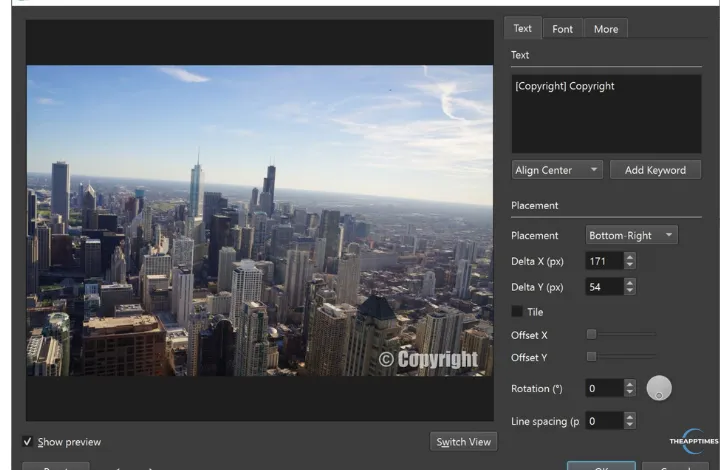
PhotoMarks is a Windows and Mac tool particularly designed to batch watermark photos. Why is it first on the list? The answer is simple. It offers the ideal mix of ease of use, watermark customization and processing speed. The software is designed with an intuitive UI, structured in three clear steps: Add Photos, Edit Photos and Setup – where you select your final configuration before processing.
PhotoMarks allows you to add a text copyright notice, a personal/brand logo, as well as metadata information, and customize each one as you please. This means you can choose pixel-perfect positioning, adjust the size of the watermark and its rotation angle, repeat it across the image for increased protection, change the opacity, select the font style and color, draw a boundingbox around it and more. To boost productivity, the program enables you to save your watermark configuration and easily reuse it in other sessions.
In addition, PhotoMarks is equipped with other useful features for image optimization. The tool gives you the possibility to resize and compress images, crop and automatically rotate them. You’ll also be able to convert to multiple image formats, including modern image files like WebP and AVIF.
Pricing
PhotoMarks offers a free trial version. Unlike other tools, this one has no time limitations (the processed photos will be watermarked).
The cost of a lifetime license is $29.95.
iWatermark Pro
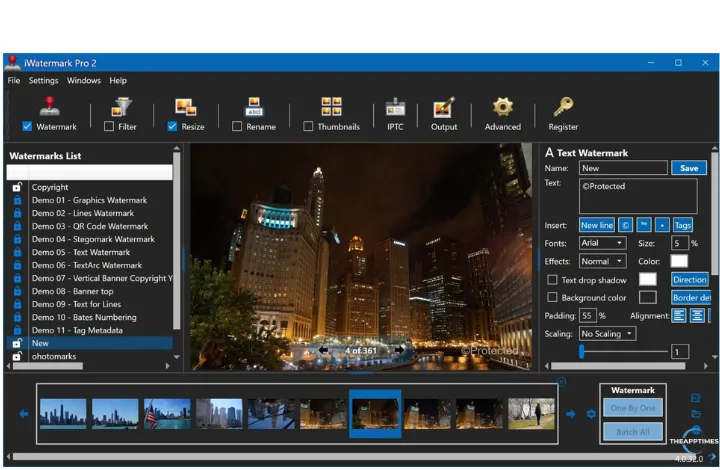
iWatermark Pro places at your disposal two desktop versions: a revamped Windows tool and an older Mac edition for Apple users. The program offers the opportunity to add both visible and invisible watermarks to pictures, which is an interesting feature. You can choose between several visible watermark types and adjust them accordingly: copyright text, banner, logo, line watermark or QR code.
At the same time, the software lets you insert two invisible watermarks: metadata and StegoMark. The first allows you to add info to IPTC/XMP inside the file, info which is meant to be preserved after basic edits. The StegoMark is a proprietary steganographic method used to embed information in the image data itself. This is basically hidden text.
iWatermark Pro provides single or batch processing workflows and an option to import/export watermark presets. You can also resize and rename files in the same session.
One thing that may upset some users is the fact that you can’t freely move or resize the watermark on the photo. You can only do it using preset settings.
Pricing
iWatermark Pro offers a 30-day free trial version. After the period expires, you can opt for a monthly or yearly subscription or a lifetime license:
- monthly: $1.98
- yearly: $18.98
- lifetime: $34.98
Make Watermark
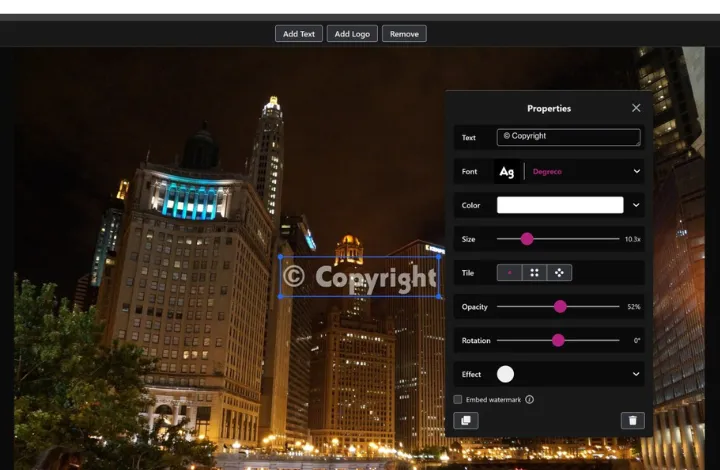
If you want to protect/brand your images without installing software on your computer, this alternative might suit your needs. Make Watermark is a browser-based solution built for watermarking images in bulk.
The tool supports two main watermark types: text and logo. You can create a textual watermark using over 900 fonts, solid or gradient colors, adjustable size, opacity, rotation, and various visual effects, or upload your own PNG logo from your computer, Google Drive, Google Photos, or Dropbox. The editor also includes built-in icons if you don’t already have a logo. For stronger protection, you can opt for tiled watermarks across the full image in straight or diagonal patterns, with adjustable spacing between repeated marks.
The design is characterized by a clean, minimalist and highly functional interface, with a large preview area and clear action buttons. Drag-and-drop importing is supported for both images and folders. Beyond watermarking, Make Watermark offers export settings for changing file format (JPEG, PNG, WEBP, original format), compression, and image resizing by width, height, percentage or exact dimensions.
Pricing
Make Watermark comes with a free edition, which allows you to process up to 10 files simultaneously. The files will have the software’s watermark applied to them. To increase this limit and remove the watermark, you’ll have to make a purchase:
- 1-year access: $19.95
- lifetime access: $39.95
Star Watermark
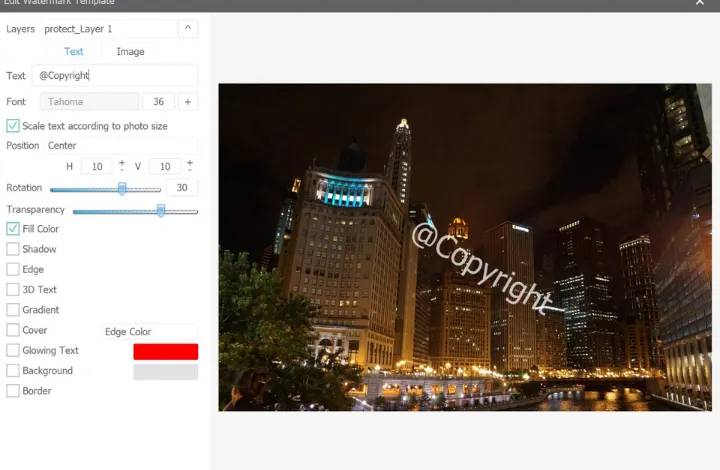
Star Watermark is a cross-platform program designed to watermark not only photos, but also videos and PDFs. It allows you to add both text and image watermarks, such as names, copyright notices, logos, digital signatures and branding elements. You can customize fonts, colors, size, transparency, shadows, rotation, gradients, strokes, and even 3D-style effects, while also adjusting placement and using multiple watermark layers.
Star Watermark supports bulk processing for hundreds of files at once and preserves EXIF data, which is useful for photographers managing large image libraries. To make your task easier, the tool lets you create your own watermark templates and load them in other projects. Besides watermarking, you’ll also find AI upscaling up to 4x, in case you want to enhance image quality.
On the downside, the interface isn’t the most straightforward and will require time for familiarization. The design also feels basic compared to some of its competitors.
Pricing
Star Watermark comes with a free version, which supports text watermarks with limited customization. To enjoy additional features, you can upgrade to the paid edition. There are three options:
- monthly: $2.99
- yearly: $9.99
- one-time purchase, 20-year use: $19.95
Mass Watermark
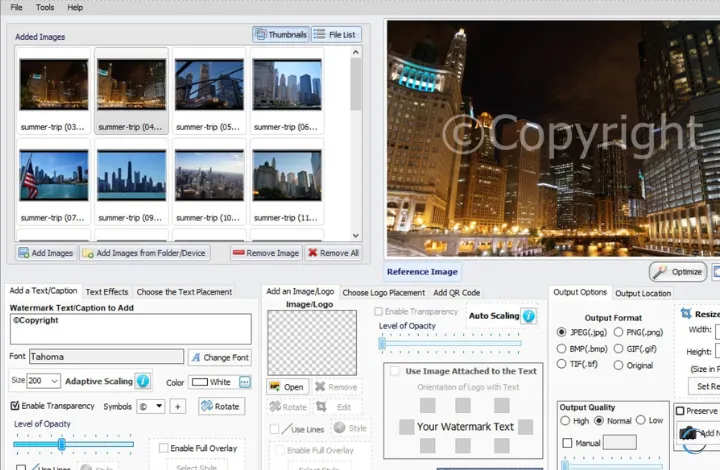
Mass Watermark is a solution that combines image protection with resizing, EXIF editing and cloud uploads. The software supports copyright text, logo overlays, tiled full-image protection, and even QR code watermarks that can link viewers to your website or business page. You can control the scaling, placement, transparency, tiling direction, and can crop part of an image to use as the watermark itself.
The tool comes with a built-in watermark design tool, which enables you to create your own watermark from scratch in case you don’t have one. It’s worth mentioning that, in addition to saving your images on a local folder, you can directly upload them to Flickr or Google Photos. On the negative side, the interface feels more utilitarian than polished. The advantage is the single workflow approach, where all the operations happen together.
Pricing
Mass Watermark offers a free trial version without any time limitations (the processed photos will have a logo on them). To remove this restriction, you’ll have to purchase a license.
The cost of a lifetime license + free minor upgrades is $30.

Leave a Reply